
Simple Notification Tester
Simple Notification Tester is a free and open source .NET 10 WPF application for sending Windows toast notifications. Useful for developers and testers who need to verify that Windows toast notifications are delivered and displayed correctly on Windows 10 and Windows 11.
Free and open source · No ads · No account required
Why use Simple Notification Tester
- Ideal for developers and testers verifying that Windows toast notifications are delivered and displayed correctly.
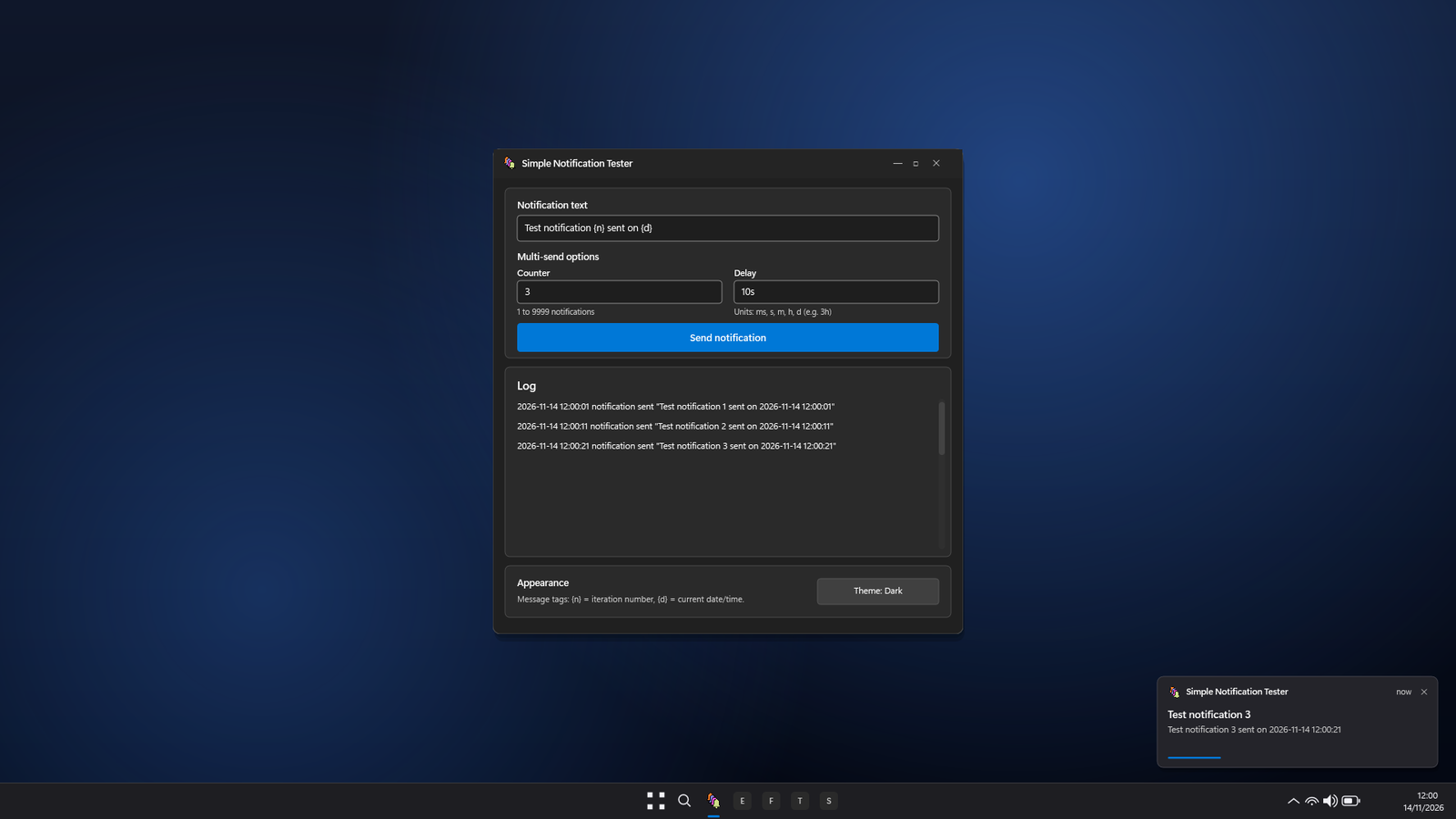
- A simple three-zone interface: configure the notification, send it, and review every sent notification in the log.
- Lightweight .NET 10 WPF app with no telemetry, no account required, and everything running locally on your PC.
Features
- .NET 10 WPF desktop application — fast, native Windows UI
- Three-zone main window: notification configuration, expanding notification log with timestamps, and appearance/theme panel
- Message substitution tags — `{n}` for the iteration number and `{d}` for the current date/time
- Multi-send support — send 1–9999 notifications with a configurable delay between each one
- Delay formats — a number followed by `ms`, `s`, `m`, `h`, or `d`, for example `500ms`, `10s`, `3h`, or `2d`
- Sends Windows toast notifications via `Microsoft.Toolkit.Uwp.Notifications` (`ToastContentBuilder`)
- Remembers window size and position between runs, and moves the window back on-screen if the saved position is no longer visible
- Remembers the selected theme (Follow system, Light, Dark)
- No tray / notify icon — just the focused main window
- 100% free and open source — no ads, no telemetry, no account required
- Scheduled delivery — Schedule notifications for a chosen date and time (including seconds in HH:mm:ss format), with real-time cancel capability
Installation
Install from source
- Download Simple Notification Tester from the GitHub repository
- Build with `dotnet build` or run with `dotnet run` (.NET 10 SDK required)
- Launch the app — a window titled Simple Notification Tester appears
- Enter the notification text, set the counter and delay, then click Send notification
Requires Windows 10 or Windows 11 and the .NET 10 SDK. The app runs entirely offline with no network access.
Requirements
- Windows 10 or Windows 11
- .NET 10 SDK
- A WPF-capable Windows desktop
How It Works
- Configure the notification text (default `Test notification {n} sent on {d}`), counter, and delay in the notification configuration zone
- Click Send notification — `NotificationBatchSender` expands the `{n}` and `{d}` tags for each notification and waits the configured delay between them
- Each toast is built with `Microsoft.Toolkit.Uwp.Notifications.ToastContentBuilder` and shown via `ToastContentBuilder.Show()`
- Every sent notification is recorded in the log with its timestamp, and the theme and window placement are saved to settings
Frequently asked questions
What is Simple Notification Tester?
It is a free and open source .NET 10 WPF application that sends Windows toast notifications, useful for developers and testers verifying notification delivery on Windows 10 and Windows 11.
Which Windows versions does Simple Notification Tester support?
Windows 10 and Windows 11, with a WPF-capable Windows desktop.
Is Simple Notification Tester free?
Yes. It is free and open source, with no ads, no telemetry, and no account required.
Do I need the .NET 10 SDK?
Yes. Simple Notification Tester is a .NET 10 WPF application, so the .NET 10 SDK is required to build or run it from source.
Does it show a tray icon?
No. Simple Notification Tester has no tray / notify icon — just the main window.